
Blog · 11 November 2026
Why do printers ask for 3mm bleed?
If you've ever sent artwork to a printer, you've probably been asked to “add 3mm bleed”. Here's what that means, and why it matters.
A cut can move slightly
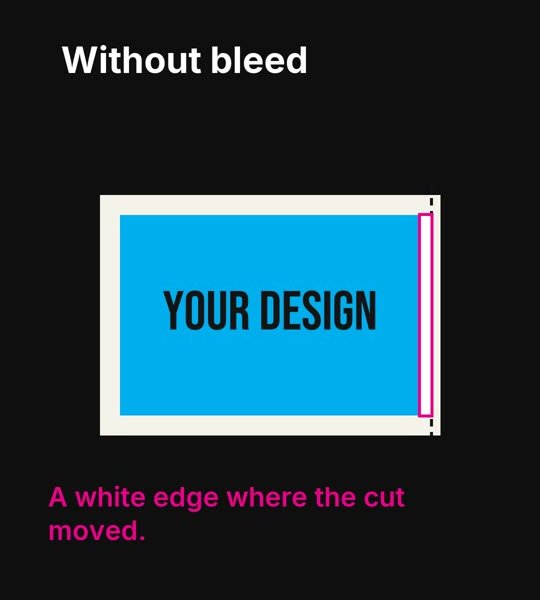
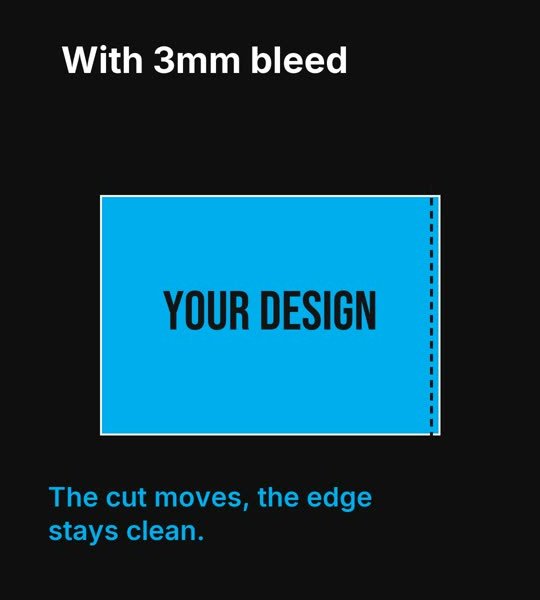
Print jobs are printed on bigger sheets and then cut to size. However careful the cutting, it can land a fraction off. If your background stops exactly at the edge of the design, that tiny movement shows as a thin white line along one side.
What bleed is
Bleed is extra background that carries on 3mm past the edge where the job will be cut, called the trim line. If the cut lands slightly out, it goes through your background instead of white paper, so the edge stays clean.
Keep words away from the edge too
Bleed protects the background. Your words need protecting the other way: keep text, logos and anything important at least 3mm inside the trim line, so a cut that lands slightly in never touches them.
How to add it
Most design programs have a bleed setting in the document or page setup. Set it to 3mm, stretch your background out to the new outer edge, and when you save your PDF, choose the option to include bleed.
Not sure if your file has bleed?
Send it over with your order and we'll check it before anything is printed. If it needs bleed adding, we'll tell you first. Our artwork guide shows bleed, trim and the safe zone on one diagram.